Tuesday, October 12, 2004

Simple Internet Lessons

Maths group again.

This time it was to test just how effective the wickED site is for children. I simply logged into the site and single clicked onto the maths stuff. As a class we looked at the different activities within the site and discussed how the activities might work. That was where I stepped out of the role as leader and let them loose on the site.
Some did fractions
Some did Addition
Some did multiplication and Division
Some did Tangrams
They all had fun.
As the activities got harder I decided to show them how to access the calculator on the PC and how to have it running minimized in the background.
As I walked around they were talking about Maths using mathematical language.

We as teachers need to catch this wave of interest. At the moment ICT is novel, it has high interest for children. If we wait until we understand it the moment will have passed and we will have lost that teachable moment.

You don't have to understand ICT, you have to be prepared to have a go. The digital natives (our children) will respect us more for trying and for admitting that we don't know everything. They will even come on board and help. Teaching and Learning are a partnership. Take a risk, try something new there is nothing to loose and so much to win.

Friday, October 08, 2004

Practical Lessons 02

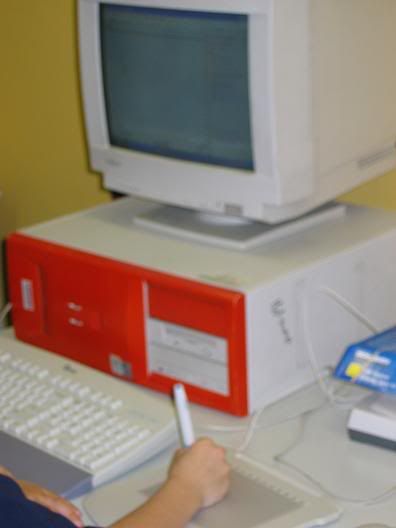
Today we tried another thing. You have all heard that tablet PCs are the new thing. Well here is the cheaper introductory option.


As you can see it is just a simple setup of PC and Tablet connected through USB.


A tablet, pen, and mouse all wireless


About $70 from Dick Smith Electrical.


Here are two Children using handwriting recognition software in WORD practicing their handwriting (during Lunch). And they were enjoying it. Obviously the novelty factor was high but a teacher walking by said she could see how he was forming his letters from a distance. I am sure there are teachers out there who could see other ideas for this.
The software only recognizes accurate formation so the boys had to get it right before it would appear in WORD.

At NAVCON they were selling Education tablets for alot more.


Thursday, October 07, 2004

Practical Lessons 1a Simple setup

This lesson went well. I used a variation on plan found at English Online, so I won't go into details of it here. This Blog was set up to show how to setup simple ICT integrated lessons.

I was using my Canon A80 as the software was already loaded on the Laptop for this. The one I usually use is a Creative PC-CAM 850, a brilliant wee camera for kids to use.

The software is Canon's browser ZX but if you are unsure try Irfanview not only free but simple to understand and has lots of features.

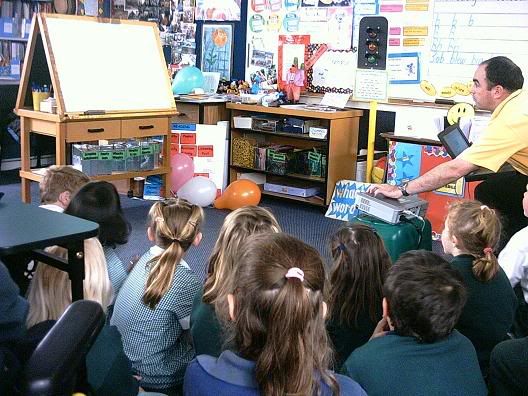
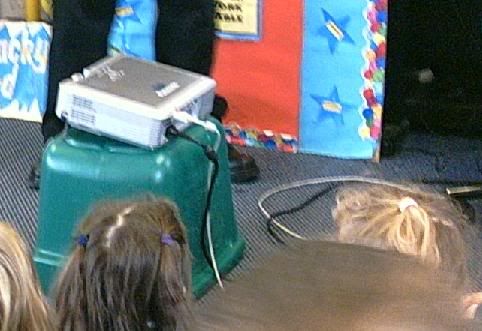
As you can see I just use the Whiteboard in the classroom and a recycle bin as a stand this kept it very simple and informal for the children.


You can't see the board but the kids could.


This highlights one of the problems - cables. I recommend remote systems where viable.

The children and I discussed about how it is important to watch for the cables and they decided to keep way from the cables.


You can see the Projector is connected to the Laptop and the camera was connected via USB.

The whole thing was literally at my feet and I had control of it all from my seat on the mat with the kids.

THE LEARNING.

The children worked in groups and we decided what we already knew.
Then we looked at Photos using terms like LIGHT and DARK.
Close up, Mid Shot, and Wide Angle were also discussed.

We also talked about why do people take photos. All great stuff.


Practical Lessons 1

Well I have had my first comment from an interested reader.
After the experiment with the graphs I am much encouraged. The kids are still buzzing and having the results published in the Newsletter gave it a real audience. The children all have their own graphs filed in their folders and today some parents came in a looked at their child's results. What really impressed me was when I did a quick assessment using a variety of Graphs the kids could all interpret (at varying degrees) what they saw.

today's lesson is with a yr 2 group looking at Photography. Visual language. The intention is to look at what images can tell us.

Simple set up
1x camera digital
1x Projector sitting in the middle of the mat.
1x Small whiteboard
1x Laptop
1x Modified level 2 lesson plan.

The idea comes from Mike Anderson and Kate Barrett, who both ran sessions at Navcon.

When it is finished I will try and place a few shots of the lesson on the Blog, along with a quick evaluation.


Wednesday, October 06, 2004

Practical lessons

The more I investigate ICT and it's uses in school, the more I here the term "great but there is no time" and another one is "how do I fit it in?"

Being the way I am I have taken this onboard and have looked at practical applications thinking of those who are a bit reluctant to use ICT.

Navcon2k4 really inspired me but like others at the conference I couldn't help feeling that the wrong people were there. The innovations and cool ideas would have inspired anyone thinking of using ICT for the first time.

anyway back to the reason for this blog.
Today Maths
Graphs the most dry and boring subject that 8yr olds can have (quoted) I introduced Textease spreadsheets and the kids wanted to know about my holidays. This expanded into what teachers do in the holidays. We talked about good questions (I don't think we focus on this enough as teachers) and I organized the results to go in the newletter BANG we have ignition. These kids have blown me away. The graphs were all different but the information was all the same. These children actually started talking about gathering and sorting information and how it shows us what is happening which things are popular and what things are not. I found myself interested in the findings.

Now this was an already planned strand and I must admit I wasn't looking forward to it. You should have seen their faces when I said that was it we have now finished stats. They are wanting to look at other surveys. If it was my own class I would take this new skill and integrate it into something else.

Anyway any comments are greatly appreciated

Monday, October 04, 2004

The end is nigh

Boy what a week. Here are a couple of shots that sum up what the event was about and the way it ended.

Over the next few weeks I hope to put some practical angles on the ideas that were covered.


Practical uses of wired and wireless communications. Sharing of data.


For some it just got too much. Software meltdown was inevitable

A night of fun

Well done the group from Opawa Cluster. Boy can you guys party. Thankyou for taking pity on a straggler and including me in your group for the night.


The educators breakout from the breakouts.

The dinner on the Thursday night was huge. There were a lot of happy educators and service providers getting a little R&R after days of intense study and professional developement and a chance to hear from leaders in the education field.


This shot is a wide angle of the dinner at Westpac Trust.

WOW what a night

Bit ups for Nick and the team at ULTRALABS SOUTH. The dinner was great and it was a great way to blow off steam.
Brilliant chance to network for teachers and people in the trade.
I have some photos and will try and place them in the Blog this week.

Here is Nick dancing the night away.
Even shrek had a good time.


iLife Breakout 8

Links to sites
freeplaymusic.com
ischool.co.nz
worth1000.com

Garage Band
The view bar can be extended just click above the loops
It can be spilt at the playhed like iMove

iTunes
When you mount a CD iTunes it always starts up
A school could buy an iPod and download all the music CDs that could be destroyed .
FM tuner means the iPod can be set to run through any Radio.

iLife

iTunes
Freeplaymusic.com
Keynote
Can do anything you can do in PP but no Hyperlinks
Too much to remember. I need to play with this stuff.
Very easy to import video

FrameSplicer Link Free creating animation

smiley iconsmiley iconsmiley icon

This is a FREE programme fro those who want to do animation on MAC

http://www.framethief.com/dnlframesplicer.html

Moviemaker link

The conference is going well.

There is a need for links for some teachers so I will attempt to log them in my blog as I hear about them.

smiley iconsmiley icon

http://www.microsoft.com/windowsxp/downloads/updates/moviemaker2.mspx

Breakout 7 the director in the class room

Forgive the messy output . . . bit jaded tis morning.

wendysheridan@xtra.co.nz

http://www.thedirectorintheclassroom.com/newzealand.php

Process

Moviemaker, Pinnacle, Digital literacy,

Stills

Reoccuring theme of letting kids play in a simple form after basic instruction

Looking into history of how filmmaking has influenced the world and events in it.

Quality not so much important at the start.

Mentors

Nikos Theodosakis Fan of LOTR

School model

AN integrated curriculum

A school focus

HOTs infused High order thinking

Curric delivered through a Multiple intel model

Pupils involved

Flimmaking wheel Might need one.

USING DIGITAL MEDIA TO ENHANCE ALREADY PLANNED CURRICULUM

BREAKOUT 4

USING DIGITAL MEDIA TO ENHANCE ALREADY PLANNED CURRICULUM
KATE BARRETT and ALISON BRENT

Constructivist approach
Authentic Integration

Big Ideas
School's Mission vision

Generic Skills
Research coop Task manage expression Using Tech
Communication Resposibilty Problem solving
Generic skills are taught from NE to yr 6
Inquiry Approach
Gewn Garweth, PBL, Kath Murdoch

Outcomes
Come from BIG IDEAS not the mandatory outcomes
If an Outcome doesn't match then they teach a standalone to fit


Note:
Out essential skills are the equivalent tot generic skills

THIS CASE STUDY WAS WITH A YEAR ONE CLASS
The idea was to produce a film about the action learning
Filmed the learning
made the footage in iMovie
Reflecting on each stage

Mixture of static images and movie to record observations
Video journal of the learning taking place
Internet to research science topic
Very sharp end product iDVD presentation
Children take the images to record their journey
Tolls
LAPTOP
PROJECTOR
WHITEBOARD
DV CAMERA (Note this can take still shots aswell if cost is restrictive)
FREE STANDING SCREEN
NEWS FLAGS

The chn observed the ongoing filming and suggested changes themselves
shared the finished product ith their peers
Can capture the teachable moment

MANAGEMENT
You have to be cretaive to make time to teach one on one
News Flags
eye contact
listening
speaking voice
good questions

iMovie
Capture the learning/teaching
Add titles music
Great fun for children engaging


Coping with different levels
profient groups become technology group
pairing chn with varied skills to encourage peer tutoring

SHARING
Had a film night to see how the Unit had been taught and how the chn learnt

EVALUATION
The chn's understanding of the generic skills exceeded the teachers expectations
The kids were always enthusiatic and displayed a joy for learning

Very special moment recording the hatching of a chicken using DV time lapse and then sharing on the projector.

Flatout like a lizard drinking

Boy what a day.

Very enjoyable. The speakers today had me glued.

Dianne Chambers is charming and engaging and the session was full of practical ideas and hints. PBL follows very closely the Action Learning Model but I like the PBL no nonesense approach to make it manageable. The idea of engaging children with images is excellent. It helps those late adopters get their toes wet into ICT integration and has enough scope for the Techies to explore the feild of visual language.

I feel somewhat guilty,smiley icon after a brilliant session with Mike Andersonsmiley iconsmiley icon ( the notes are earlier in the Blog) I felt another sit and listen spot was the last thing I needed so I bunkedsmiley icon and sat in on an Apple iDVD lesson. Jim was entertaining and informative I know from experience that introducing the idea of movie making really inspires some reluctant writers and after Mike's session I know that it can support a good writing programme from either ignition, sequencing and even through to publishing. I must admit it is refreshing to see ICT being used for more just being a flash typewriter.

I just hope I can keep up the hectic pace. Note for anyone doing this next time. . . plan where you might have to be as late speakers can make you run ALL DAY. I am positive that is not healthy for you.

Quote of the day goes to Dianne Chambers " How do you eat an elephant? Answer, One bite at a time"

Haere ra

To much computers is making writing bad?

Mike Anderson Elmwood School
mikea@elmwood.school.nz.

Notes from Breakout 2

ICT tools positive influence
Information
Access

Negative influence

At first glance ++
Perceived enhancements

Writing In decline?

If so why so may emails, the first speaker this morning spoke about digital age yet she read her notes and loved her new tablet.
Txt email C4 Channel steaming writing across the bottom of the screen.

Writing exercise.
John suddenly found himself in a library. He was surrounded by old books and really old furniture. What he couldn’t understand was how did he get there from the top of the spire and where were the rest of the group.
As he wondered about he started to realise that he wasn’t even in the same

Texting is the devil’s work
Beach cricket - test matches (wrong equipment, strange rules) emersion on your own terms

Swimming hole/hydro-slide – Olympic games (mucking about in pools swimming hole)

Text and informal email – formal writing (Kids messing around)

Teachers are the Key
Standards
Modelling (correct signage around schools)
Values an beliefs

Swimming – hole writing
Make a teaching point
Real contexts – txt, blogs, email, websites
Practice match values.

The sequence and order of things
Digital shots of popcorn iPhoto then drag and drop the pictures into sequence. Projector into the classroom.
On the plastic container and projected onto the small whiteboard on the mat.

Storyboarding for a movie.
Setting
Character
Problem
Scene changing lends well to teaching paragraphs

Scene one a narrow shot of the inside of an old library
Scene two John is in close up a look of amazement is on his face
Scene three wide shot of the John in the library looking around now he looks worried

When you return to the photos have the children look carefully at the shots and look in depth. Emotion colour.

Junior Kids
Write about what we do when we get to school
One word staters
Snap a simple shot to ignite or to end the publishing
Reflective writing for juniors paint snails and then reflect back and write about it
Type directly onto a laptop with a projector model Thankyou letters in shared writing.

Opening Speech? What opening speech?

I must admit I was disappointed with the MoE speakers speech. It was not the least bit inspiring and it seemed to drone on about what the Govt has done in the form of CLUSTERS and FELLOWSHIPS. This conference has been advertised as a chance to (Rejuvenate and Inspire). Being subjected to someone explaining that we are following closely in the footsteps of another countries progress does nothing to INSPIRE.

On the other hand the keynote speaker did hit the point. Prof Thomas Sergiovanni smiley iconsaid that the biggest obstacle to success in education is the alienation and disengagement that so many students experience. Surely we must look to our own community/culture for answers. History is full of mismatched discourses and ill fitting solutions to problems. Just because it works in one community does not mean it will work in another. I think the opening speaker needs to spend less time visiting our Neighbours across the water and start listening to the New Zealand Teachers of New Zealand Kids. By all means look at what is happening overseas and take note but to try and fit another nation's solutions to our situation is courting disaster. I think our opening speaker could do with some lessons in public speaking. Teachers are looking for inspiration not exasperation. I also wonder what happened to the word USE? It seems that it has been completely replaced by the word UTILISE and its proliferation in the opening speech was somewhat superfluous.

Two thumbs up to Nick and the team for the rest of the day.smiley iconsmiley icon

PS. Did Mr Fancy actually declare the conference open. I think I had drifted off by then.


Captain's Log (Always wanted to say that)

Well the first day is done. Had a very interesting time at Unleashing Your Creativity. We unleashed something . . . still not quite sure what it was though. Meet some very interesting people. Cheers to Dave, Ross, Helen, Blair, Glennys and the others.

We starting looking at a programme called subethaedit. It works like a real time chat programme you can download from Coding Monkeys. I'm not sure if it will run on Windows. Basically it lets you chat in real time and you can add to the group discussion at any point on the screen. I pasted a copy of one chat into this Blog further down. It works across an intranet or I suspect a LAN aswell. Not sure about across the internet, will check with Richard about these issues.

Just after we started Richard (Millwood) smiley iconsuggested we go next door and work on a more hands on session. We ended up making a Broadcast show that had both live and prerecorded items. Personally it was a large project and it it took all our time and energy to produce a 5 minute presentation. Not the way I would do it with children under 8. I think the idea is excellent but we teachers found that the technology had a tendency to fail us when we least needed it to. This can be the kiss of doom when presented to those late adoptors and when you are trying to inspire creativity in your class. smiley icon

The basic structure of the groups and their jobs is worth remembering and I will try and drop Richard a line and ask for a list of the groups and their jobs. The session was rich in problem solving and communication challenges. I think the same could be done with VHS and some simple props like a desk or some other sort of Newsreaders table. This would give kids the ability to feel safe behind something the first time they tried. The focus could be on GOOD QUESTIONING and ACTIVE LISTENING SKILLS. The audience could be another class of their peers or a junior buddy class - it could inform, entertain or carry a school wide message. (Just some things that come to mind).smiley icon

I have already looked into catching up with people who can supply eWhiteboards and will look into this tommorrow.

smiley icon

Catalysts for creativity

The following notes were takenas the session was running I have deliberatelly left all the grammar the same as this is how I heard it.
Open questions
being in volved in real learning

non-conventional influences
inspiration (not the software)
emotional/spiritual awareness
technical ability, and the ability to evaluate, review and implement technical ability
proper equipment and facilities

taking risks and knowing there is no wrong answer
an open classroom where all chn feel they belong
Having the freedom/support to take risks and learn from one another
Context that is engaging & initially experiential.

Openess to ideas
Creativity modelled by the teacher

Support ideas no matter how wild. We have a group of lead students that rarely work on formal activities in class but rather discuss ponder share and often conplete the formal assignment material in their own time.
No possibility is ever discounted
Encouragement to persevere

Confidence that peers will give everyone space
As teachers we should be able to model a willingness to have a go and fail so they see it is ok

Allow kids to make mistakes and encourage them to take risks
But surely we need to be able to model both success and failure
Very often we ask kids to think But have we actually taught them hoe to.
That is a very good comment


Knowing that a mistake is a learning experience
co-operative learning
Making a mistake is not a crime but not learning from it is.

The flexibility to allow students freedom to follow their thinking and share through dialogue with their peers
Allowing/encouraging? everybody to contribute and have a go. Looking for open doors rather than how to close them. Being prepared to risk getting egg on your face.
Number of computers

Inhibitors for creativity
excessive adminastative trivia and striving to complete goals rather than letting learing develop its own structure and life

too many restrictive rules (although rules are required for filteering chaos into an end-product that's structured and meaningful)
Narrow mindedness / short sightedness (a non-open mind)
Lack of skill (creativity needs to be apparent in some way; without skill with a specific medium, this isn't possible)
Things not working properly

Criticism too early in the process

Controlling environment

Closed questions

Time restrictions

Compliance issues

Teacher confidence
Lack of skills

The overcrowded curriculum
Lack of freedom to explore
Task and assessment orientation
creativity doesn't happen in a void. it occurs , unplanned at times, in the middle of something else.

Barriers that I have seen
Small fingers can't navigate keyboards well


Teacher impatience agreed. and teacher perception.

Edorus taken during filming


NAVCON2k4 New Zealand Oct 2004

In the beginning

This is really just a test to see how the Blog looks. It is my intension to keep it as a journal. I will probably update notes as I go. I will try and include as many visual prompts (pics) as possible.

Here's to an interesting conference.